Understanding how crypto wallets work starts with one fact: a crypto wallet doesn’t actually hold your crypto. It holds the keys that prove the crypto is yours. That single idea is the difference between people who feel calm about what cryptocurrency actually is and people who panic every time they open an app.
This guide walks through how crypto wallets work, what’s really happening behind the scenes, and how to choose and back up a wallet that fits how you actually use crypto — not how some YouTube video says you should.
TL;DR
- A wallet stores keys, not coins. Your coins live on the blockchain.
- Your public address is safe to share. Your private key and seed phrase are not — ever, to anyone.
- A 12 or 24-word seed phrase is the master backup. Lose it with no copy and the funds are gone. Share it and the funds are gone.
- Custodial (an exchange holds your keys) is fine for small amounts and active trading. Self-custody (you hold the keys) matters more as the amount grows.
- Most modern self-custody wallets are multi-chain — one seed phrase can manage Bitcoin, Ethereum, Solana and more.
The one-sentence version
A crypto wallet is a tool that stores the keys that control your crypto. The crypto itself stays on the blockchain.
That’s the whole reframe. Hold onto it, because almost every confusing thing about wallets — backups, recovery, hardware devices, seed phrases — makes sense once you stop thinking of a wallet as a container for coins.
When I started using crypto in 2017, the moment everything clicked was realizing the coins weren’t inside my software wallet. They were sitting on a public ledger somewhere, and my wallet was just the app that knew how to prove they were mine. Every beginner hits that same realization eventually. Better to hit it on page one.
The beginner misconception that causes 90% of confusion
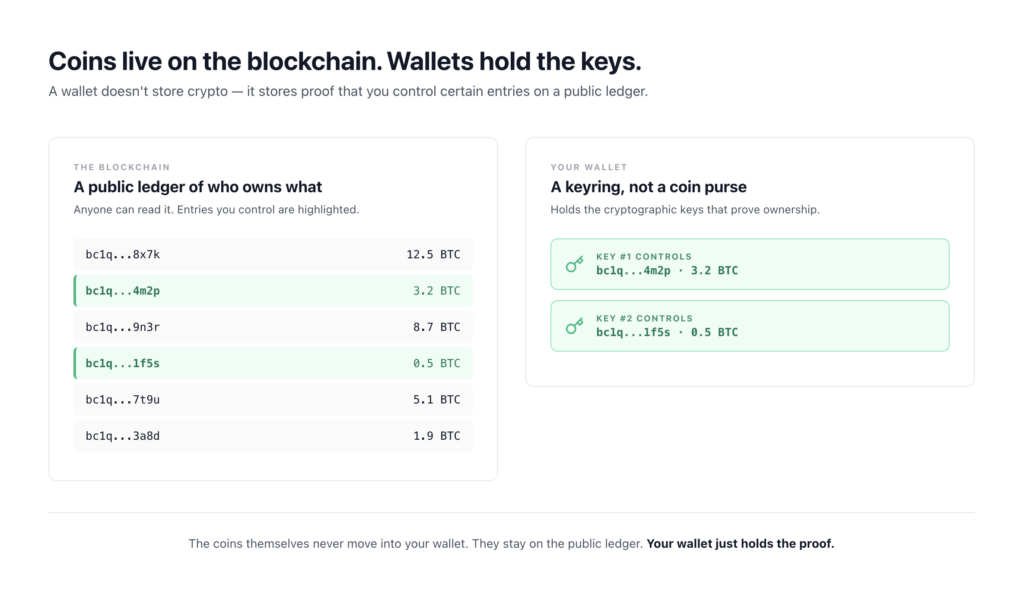
Your crypto is not “in” your wallet. It’s on the blockchain — a shared public ledger that records who owns what. The wallet just holds the cryptographic proof that lets you move it.
Think of it less like a leather wallet and more like a keyring. The coins are locked in a public vault that everyone can see. Your keyring has the specific keys that open your slots in that vault. Lose the keyring? You can’t open your slots. Hand someone a copy of your keyring? They can empty your slots before you notice.
This is also why “moving” crypto between wallets isn’t really moving anything physical. You’re updating the blockchain to say a different key now controls it. The ledger changes. Nothing travels.
Public keys, private keys, and addresses — without the math
Three terms, one job: prove ownership without revealing the password.
- Private key — the secret. Think of it as the master password to a specific slot of crypto. Anyone with it controls the funds. Full stop.
- Public key — derived from the private key through one-way math. You can go from private to public, but you can’t go backwards.
- Address — a shortened, more user-friendly version of the public key. This is what you share to receive funds.
The useful analogy: the address is your account number (share it freely, paste it into messages, put it on a tip page) and the private key is the password (never share it, never type it into a website, never photograph it).
The one-way math part matters and you don’t need to understand the formulas. Just know this: deriving your public key from your private key is easy. Trying to reverse it — to guess the private key from the public key — would take more energy than exists on Earth. That asymmetry is the entire security model of crypto.
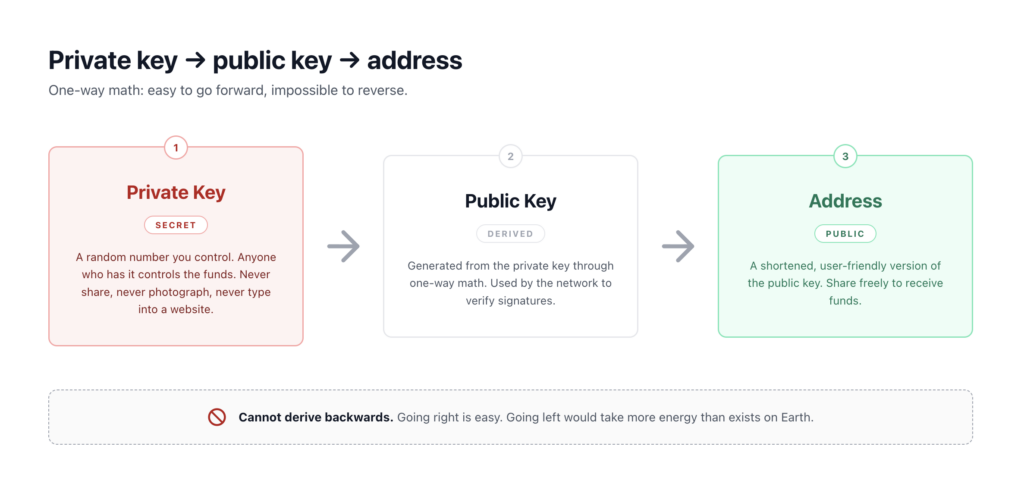
When you send Bitcoin, your wallet uses your private key to sign a transaction. The network checks the signature against your public key. If it matches, the transaction is valid. The private key itself never gets broadcast anywhere. That’s the magic.
Seed phrases — what they are and why they matter so much
Here’s the problem: a private key is a long string like 5KJvsngHeMpm884wtkJNzQGaCErckhHJBGFsvd3VyK5qMZXj3hS. Backing that up by hand is a nightmare. One wrong character and you’ve lost everything.
So the industry standardized on something called BIP39 — a method for converting a private key (or rather, the seed it comes from) into 12 or 24 ordinary English words drawn from a fixed list of 2,048.
A typical seed phrase looks like:
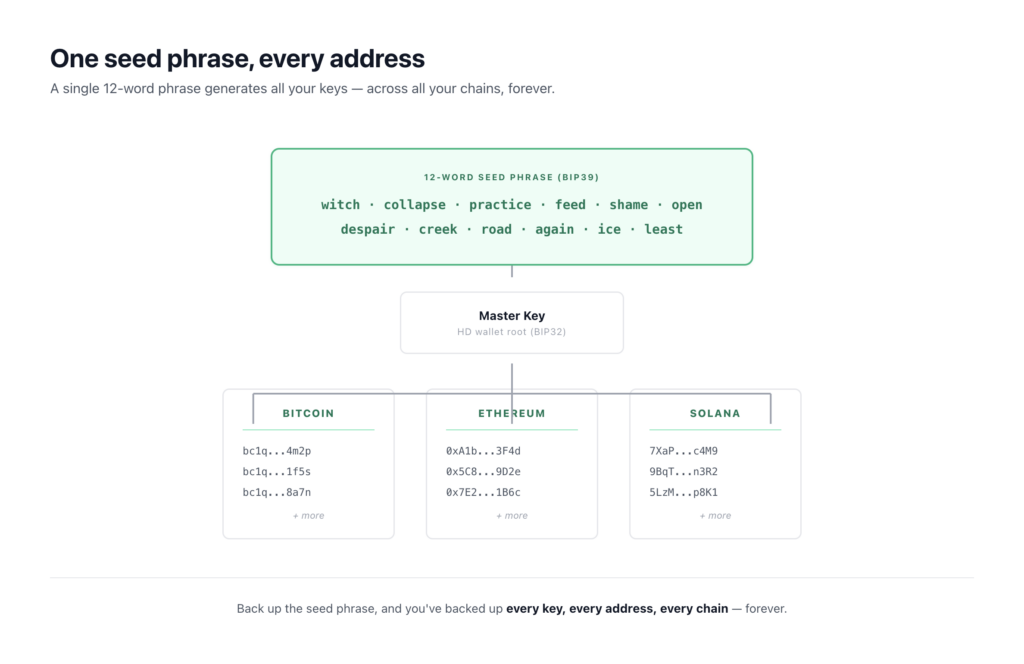
witch collapse practice feed shame open despair creek road again ice least
(Example only — never use a seed phrase you found in an article. Real wallets generate yours randomly during setup.)
That’s it. Those words are the master backup. From them, your wallet can regenerate every private key, every public key, and every address you’ve ever used.
Why 12 or 24 words?
Both come from BIP39 and both work. The difference:
- 12 words ≈ 128 bits of entropy — the random material that makes the seed uncrackable. Standard for most software wallets.
- 24 words ≈ 256 bits of entropy. Standard for most hardware wallets.
Both are effectively impossible to guess by brute force — we’re talking numbers larger than the count of atoms in the observable universe. The 24-word advantage is cryptographic margin, not practical safety. If a 12-word phrase ever became guessable, the entire internet’s encryption would have bigger problems.
Why words instead of random characters?
Three reasons. Words are easier for humans to write down without errors. The BIP39 word list is designed so the first four letters of each word are unique, which gives you error-checking and makes recovery software forgiving. And the standard is consistent across wallets, so a seed phrase from one BIP39 wallet can usually be restored in another.
That last point matters a lot. We’ll come back to it.
The wallet types map
The first question isn’t “hot or cold.” It’s: does someone else hold your keys, or do you?
Custodial wallets
An exchange or service holds the keys on your behalf. When you keep Bitcoin on Coinbase, Kraken, or Binance, that’s custodial. You log in with a password, they manage the keys behind the scenes.
Tradeoffs:
- Easier — password reset, customer support, familiar login flows.
- The provider can freeze your account, get hacked, or in rare cases go bankrupt. (FTX is the obvious recent example.)
- Fine for small balances, active trading, or while you’re still learning.
This is the part where some crypto influencers start yelling. Ignore them. Custodial accounts are appropriate for plenty of real situations. The risk only matters in proportion to the amount.
Self-custody wallets
You hold the keys. Nobody can freeze, seize, or lose your funds for you — but nobody can recover them for you either. There are two main flavors.
Hot wallets — connected to the internet.
- Software wallets on your phone or desktop (Trust Wallet, Phantom)
- Browser extension wallets (MetaMask)
- Mobile-first wallets like Coinbase Wallet (different product from the Coinbase exchange)
Convenient. Good for everyday use, small balances, interacting with apps. Vulnerable to malware, phishing, and your phone getting compromised.
Cold wallets — kept offline.
- Hardware wallets — small devices like Ledger or Trezor that store keys offline and sign transactions on the device itself
- Paper wallets — a seed phrase written on paper and locked away (rarely used now)
Slower to use. Much harder to attack remotely. Suited for amounts you don’t plan to touch often.
One wallet, many chains
Older guides told beginners they needed a separate wallet for each blockchain. That advice is outdated. Most modern self-custody wallets — MetaMask, Phantom, Coinbase Wallet, Trust Wallet — are multi-chain. A single seed phrase can hold Bitcoin, Ethereum, Solana, and many tokens across different “account paths” under the hood.
You don’t need a wallet zoo. One well-backed-up wallet usually does the job.
Multisig — briefly
Multisignature wallets require multiple keys to approve a transaction (say, 2 of 3). They’re how serious holders and companies reduce single-point-of-failure risk. Not a beginner tool, but worth knowing exists for later.
How to actually back up a wallet
This is the part where most articles get vague. Specifics:
Write the seed phrase down on paper. Use a pen, not pencil. Number each word. Double-check spelling against the wallet’s display.
Do not do any of the following:
- Take a photo of it
- Type it into a Google Doc, Notes app, or password manager that syncs to the cloud
- Email it to yourself
- Store it in iCloud or Google Drive
- Tell anyone what it is, including “support agents” — there is no scenario where a legitimate wallet asks for your seed phrase
The reason isn’t paranoia. It’s that every breach of a cloud account where someone stored a seed phrase has ended with the funds gone. Phones get compromised, cloud accounts get phished, screenshots get backed up automatically. Your seed phrase needs to live somewhere that can’t be touched over the internet.
The two-locations principle. Keep at least two copies in different physical places. House and a parent’s house. Safe and a safety deposit box. The threat isn’t usually theft — it’s fire, flood, or a house move where the one paper backup goes missing.
Steel backups. If you’re holding meaningful amounts long-term, a steel seed phrase plate — basically a metal card you stamp the words into — survives fire and water in a way paper doesn’t. They typically run $70–150 for stainless steel options, with premium titanium versions going higher.
Losing a seed phrase with no backup is the single most common way self-custody users lose access to their funds. There is no support line. There is no recovery. The funds sit on the blockchain visible to everyone, untouchable, forever.
Where people actually lose money
Pattern recognition matters more than paranoia. The losses fall into a small number of categories.
Phishing sites. A Google ad or a Discord link leads to a site that looks like the real wallet or exchange. You type your seed phrase to “validate” or “restore.” It’s gone in minutes. Real wallets never ask for your seed phrase after setup.
Malicious browser extensions. A fake MetaMask in the Chrome store. A “wallet helper” that scrapes keystrokes. Install only from the official source, verified through the wallet’s own website.
“Support team” DMs. You post a question in a Discord or Telegram. A friendly admin DMs you offering to help. They are not the support team. There is no support team. Real teams will tell you to file a ticket and never ask for your seed phrase.
Fake apps. Knockoff wallets in app stores, sometimes ranking above the real one. Download links from the wallet’s official website only.
Address poisoning. Scammers send tiny transactions from an address that looks similar to one you’ve used before. Then you copy-paste from your transaction history and send to the wrong place. Always verify the full address, not just the first and last few characters.
Signing blind transactions. Approving a transaction in a wallet without understanding what it does. Some malicious smart contracts trick you into granting unlimited spending permission. If you don’t recognize the action, don’t sign.
Lost seed phrases. Covered above. The most common loss mode by far, and the one that doesn’t involve any attacker.
Crypto is unforgiving in a way traditional banking isn’t. There’s no chargeback, no fraud department, no reversal. The flip side of “you control your money” is “you’re responsible for your money.”
Choosing your first wallet
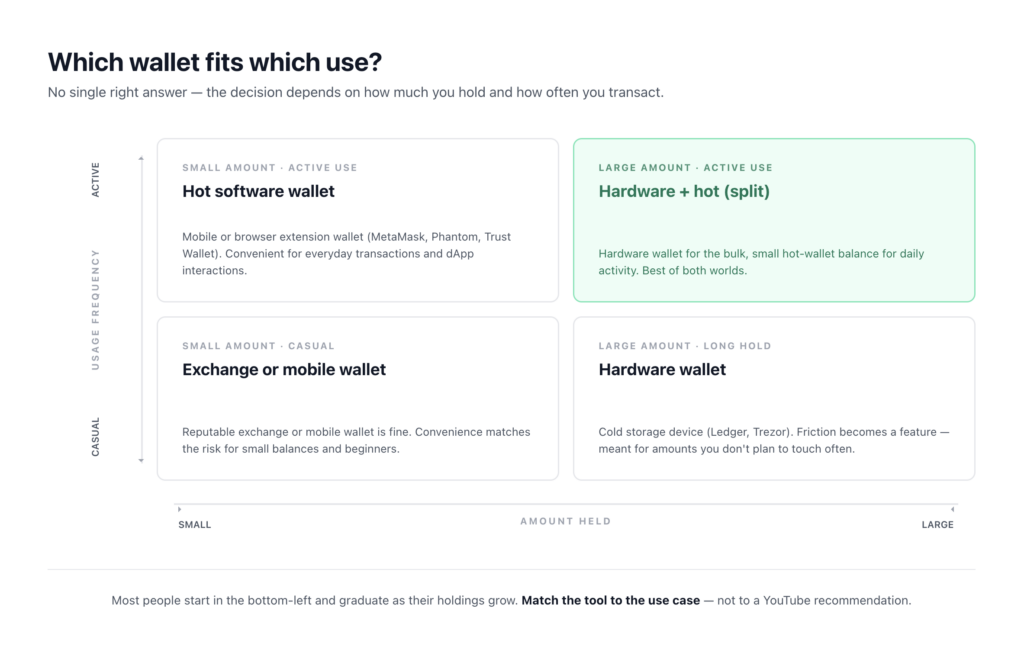
There’s no single right answer. The decision depends on two variables: how much and how often.
A rough framework:
- Small amount, casual use — leaving funds on a reputable exchange or in a mobile wallet is fine. The convenience matches the risk. This is most people starting out.
- Small amount, active use across apps — a hot software wallet (mobile or browser extension) makes sense. You want to interact with the network.
- Larger amount, long hold — a hardware wallet earns its keep. The friction of signing on a device becomes a feature, not a bug.
- Larger amount, active use — many people split: a hardware wallet for the bulk, a hot wallet with a small balance for daily use.
Whatever you pick, the same setup rules apply. Buy hardware wallets only from the manufacturer’s official site — not Amazon, not eBay. Download software wallets only from the linked-from-official-site source. Verify the seed phrase backup before sending in meaningful funds.
If you haven’t bought any crypto yet, the wallet question can wait. Most exchanges will hold your first purchase safely while you figure out your setup. See how to buy crypto safely for that part.
Recovery scenarios — what actually happens
The single most empowering thing about understanding wallets is realizing that the device or app doesn’t matter much. The seed phrase does.
Phone lost or stolen. Install the same wallet app on a new phone. Choose “restore” or “import existing wallet.” Enter your seed phrase. Your balances appear within seconds. The phone never held your crypto — the blockchain did.
Hardware wallet broken or lost. Buy a new one. It doesn’t have to be the same brand. Because BIP39 is a standard, a Ledger seed phrase generally restores to a Trezor and vice versa. Same recovery flow: new device, restore from seed phrase, balances reappear. One caveat: Ledger and Trezor use slightly different default derivation paths, so if balances don’t appear immediately after a cross-brand restore, the funds aren’t gone — they’re on a different path under the same seed. You can add accounts or switch paths in the new wallet’s settings to find them.
You forgot your PIN. The PIN protects the device, not the funds. Reset the device, restore from seed phrase, set a new PIN. The funds aren’t affected.
You lost the seed phrase but the wallet still works. Open the wallet’s security settings while you still have access, write the phrase down properly, and store it. This is the most important time-sensitive task you’ll ever do in crypto.
You lost the seed phrase and the wallet. This is the bad one. There is no recovery path. The funds remain on the blockchain, but no one can sign for them.
The pattern: every recovery flow runs through the seed phrase. Protect it like it’s the only thing that matters, because operationally, it is.
Common questions
Can someone steal my crypto if they know my wallet address?
No. The address is the receive-only side. Knowing it lets someone send you funds or see your balance — both of those are by design on a public blockchain. They can’t sign transactions without the private key.
Is a hardware wallet really necessary?
Not for everyone. If you’re holding a small amount or actively trading, a reputable exchange or mobile wallet is reasonable. Hardware wallets earn their cost when you’re holding amounts you’d be genuinely upset to lose and don’t need to touch often.
What happens to my crypto if a wallet company goes out of business?
If it’s self-custody — nothing. Your keys are yours. Restore the seed phrase in any compatible wallet and your funds are accessible. If it’s custodial, you’re a creditor and have to wait for the bankruptcy process. This is the core practical difference between the two models.
Can I keep the same seed phrase forever?
You can, and many people do. The only reasons to rotate to a new seed phrase: you suspect the old one was exposed, you typed it into something you shouldn’t have, or you’re consolidating multiple wallets. Otherwise, a properly backed-up seed phrase is good indefinitely.
Are 12-word seed phrases less secure than 24?
In theory, yes. In practice, both are uncrackable with current and foreseeable computing. The realistic threats to your seed phrase are physical (someone finds your paper) or social (you get phished), not cryptographic. A 24-word phrase doesn’t protect against either of those.
Where to go from here
You now understand the actual model: coins on the chain, keys in the wallet, seed phrase as the master backup. That’s more than most people who own crypto know.
The natural next step is the buying process if you haven’t been through it yet — see our beginner’s guide to buying crypto safely. Future articles in this series will cover related topics like dollar-cost averaging and decentralized exchanges.
Whatever you do next, write your seed phrase down on paper before you do it. Everything else builds on that one habit.
A note on financial advice
This article is for education, not financial advice. I’m sharing how crypto wallets work and how to keep your keys safe — not telling you what to buy, hold, or do with your money. Crypto is volatile and risky. Only put in what you can afford to lose entirely, and make your own decisions based on your own situation.